
Trust Assurance Across Every Device
Build trust and security across all devices, ensuring robust network integrity and resilience against emerging threats.
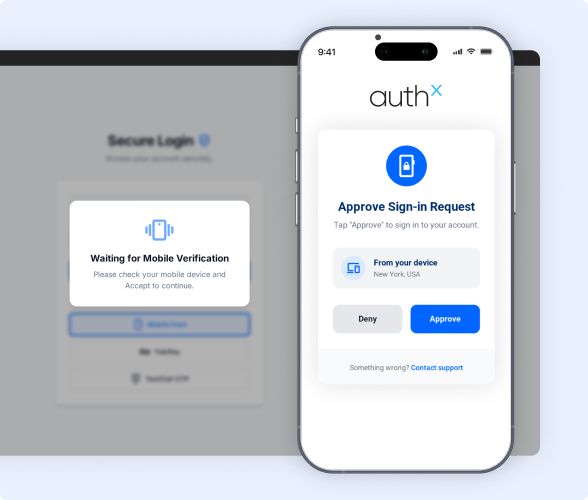

What is Device Trust?
Device Trust is a crucial security protocol that verifies the legitimacy of devices accessing your systems and applications, bolstering defenses against unauthorized access. Enforcing stringent authentication criteria ensures that only trusted devices can connect, enhancing your organization’s resilience against potential threats.
How Device Trust Works
Device Trust ensures only secure, compliant devices can access your systems. It continuously verifies device identity, health, and context before granting or restricting access.
01 Verification
Device Trust begins with verifying the legitimacy of devices seeking system/application access, ensuring they meet predefined security standards.


02 Assessing Device Health
It evaluates the health status of devices, managed and unmanaged by checking factors like operating system versions, patch levels, and security configurations to ensure compliance with security policies.
03 Authentication
Through stringent authentication processes, only devices that pass verification and health assessment criteria can connect, strengthening application security.
04 Policy Enforcement
Device Trust enforces access policies based on device health and context, ensuring that only trusted and compliant devices can access sensitive company resources and mitigating potential security risks.

Why Device Trust is Critical to Identity Security?
Identity security is crucial to protect your organization from cyber threats. Device trust is the process to ensure that only authorized devices can access your system and applications, significantly reducing the risk of breaches and unauthorized access.
Trusted devices act as the first line of defense, verifying user identity and maintaining the integrity of your systems. By implementing device trust, you create a robust security framework that protects sensitive information and upholds compliance with regulatory standards.
AuthX Device Trust in Action
Not every device deserves access, even if the user does. AuthX Device Trust checks the device first, so risky endpoints never become your weakest link.
Secure Access Control
AuthX's device trust solutions verifies that each device's identity and security posture before granting access. It prevents unauthorized devices from compromising your system's integrity.
Robust Security Framework
Organizations strengthen their security framework by integrating AuthX device trust. This proactive approach minimizes vulnerabilities by securing endpoints and strengthens defenses against evolving cyber threats.
Device Visibility
Gain comprehensive visibility into all devices accessing your system, ensuring better control and security management.
Supports BYOD (Bring Your Own Device)
AuthX accommodates BYOD policies by securely integrating personal devices into the network, maintaining security standards without compromising flexibility.
Simplified Compliance
AuthX device trust solutions align with regulatory requirements and industry standards. They simplify compliance processes and reduce the risk of penalties or data breaches.
Proactive Cyber Protection
Our device trust employs advanced security protocols to mitigate risks from malware, unauthorized access attempts, and other cyber threats. This stance effectively safeguards sensitive data and organizational assets.

Protect Your System Start with Device Security
Securing every device is crucial for a robust security strategy. According to HSD, 46% of organizations faced cybersecurity incidents from unpatched vulnerabilities in 2020. Device authentication is key to preventing breaches and protecting sensitive data.
Prioritizing device security builds trust within your organization and enhances confidence among employees, partners, and clients. Ensure that only secure, verified devices access your network to maintain a strong defense and foster a safer, more productive environment.